
Cear pave CP-4000 — Setup Guide
Cear pavé
あなたの空間に、立体音響という体験を。
Experience spatial audio in your room.
Step 01 — Connect
How to Connect
まず、接続してください。
Power on スピーカーの電源を入れます
Press the power button on the bottom of the unit. The LED will light up when ready.
本体下部の電源ボタンを押してください。LEDが点灯したら起動完了です。
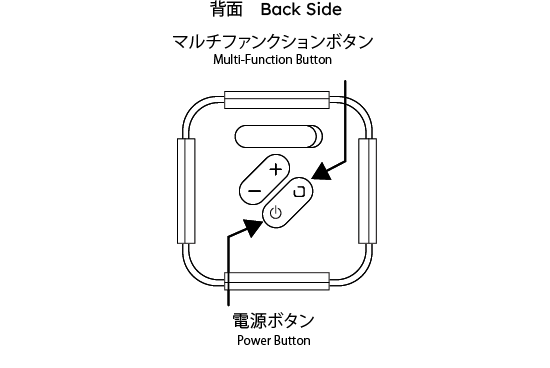
Hold the multi-function button for 2 seconds マルチファンクションボタンを2秒間長押し
Press and hold the multi-function button on the back until pairing mode is activated.
背面のマルチファンクションボタンを2秒押し続けると、Bluetoothペアリングモードになります。
Select the device in Bluetooth settings Bluetooth設定でデバイスを選択します
Open Bluetooth settings on your device and select from the list below.
スマートフォンのBluetooth設定画面から以下を選択してください。
ホテル設置の場合、お部屋番号が表示される場合があります。
Check the sound mode モードを確認します
Choose from three sound modes.
Press the + button and multi-function button together to change modes.
3種類のモードから、お好みに応じて選択可能。
モード変更は「+ボタン」と「マルチファンクションボタン」の同時押しで切り替えできます。
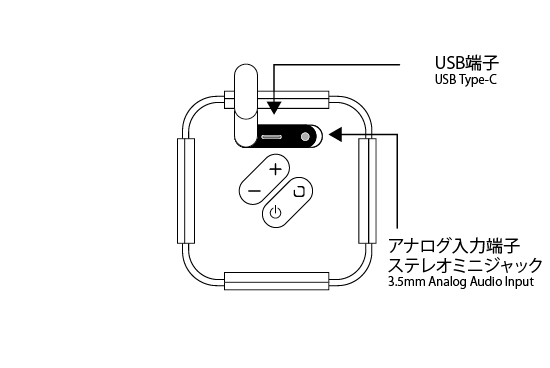
アナログ端子 ANALOGUE
Connect an audio cable to the 3.5mm analog input on the side of the unit.
Compatible with any device with a headphone output — TV, PC, or smartphone. Input switches automatically upon connection.
本体側面の 3.5mm アナログ入力端子 に、オーディオケーブルを接続してください。テレビ・PC・スマートフォンなど、ヘッドフォン出力を持つあらゆる機器と有線で接続できます。接続後は入力ソースが自動で切り替わります。
USB
Connect your PC or smartphone to the unit via USB cable.
Digital signal transmission ensures clear, lossless audio. No driver installation required.
本体の USB端子 とPCまたはスマートフォンをUSBケーブルで接続してください。デジタル信号のまま伝送するため、音質劣化のないクリアなサウンドが楽しめます。ドライバーのインストールは不要です。
Step 02 — Listen
Spatial Audio
音が、空間になる。
Sound becomes space.
Cear pave is a speaker with our spatial audio technology, "Cear Field."
A single unit creates sound that fills the whole space.
It brings a new listening experience to your room.
Cear pave は、空間立体音響技術「Cear Field」※1 を搭載したスピーカーです。
たった一台からは想像できない、空間に広がる音場再生を実現。
あなたの空間に、これまでにない新しいリスニング体験をお届けします。
Cear Field Technology
Our original patented technology.
It analyzes stereo sound in real time and optimizes it for Cear pave.
You can enjoy natural sound that fills the space, without feeling the speaker.
Cearの特許技術。
ステレオ音源をリアルタイムに解析し、シーイヤーパヴェでの再生に最適化。
空間立体音響として再構築することで、スピーカーの存在を感じさせない自然な音場を生み出します。
Simple to Use
ust connect and play from your device.
No complicated setup is needed.
接続して端末で再生するだけのシンプルな操作性。
複雑な設定は一切不要です。
Choose from three sound modes.
Press the + button and multi-function button together to change modes.
3種類のモードから、お好みに応じて選択可能。
モード変更は「+ボタン」と「マルチファンクションボタン」の同時押しで切り替えできます。
Standard → Music → Movie → Mono
スタンダード → ミュージック → ムービー → モノ
Premium Design
A refined design that blends into any interior.
インテリアに自然と溶け込む、洗練されたフォルム。
3-Way Connection
Connect with Bluetooth, analog, or USB.
Choose the best way for your use.
Bluetooth・アナログ・USBに対応。
用途に応じて最適な接続方法をお選びいただけます。
Demo Sound Source — Cear pave CP-4000
Watch on YouTubeタップして動画を再生 / Tap to play the demo video
Recommended Playlist — Curated for Cear pavé
Open Playlist
空間音響で聴きたいおすすめ音源をまとめました
A playlist selected to showcase spatial audio.
Take It Home.
気に入っていただけたら、ぜひお手元に。
Available at the official store.
store.cear.tokyo